
Your Wandering Tech Guide for Dementia Care
Caring for someone at risk of wandering can feel overwhelming, but you’re not alone. The right tools can make all the difference.
Start with the Wandering Risk Assessment to understand your loved one’s needs. It only takes a few minutes and helps match tools to your situation.
Every person is different. That’s why our tech suggestions are grouped by risk level so you can build support step by step, without guesswork.
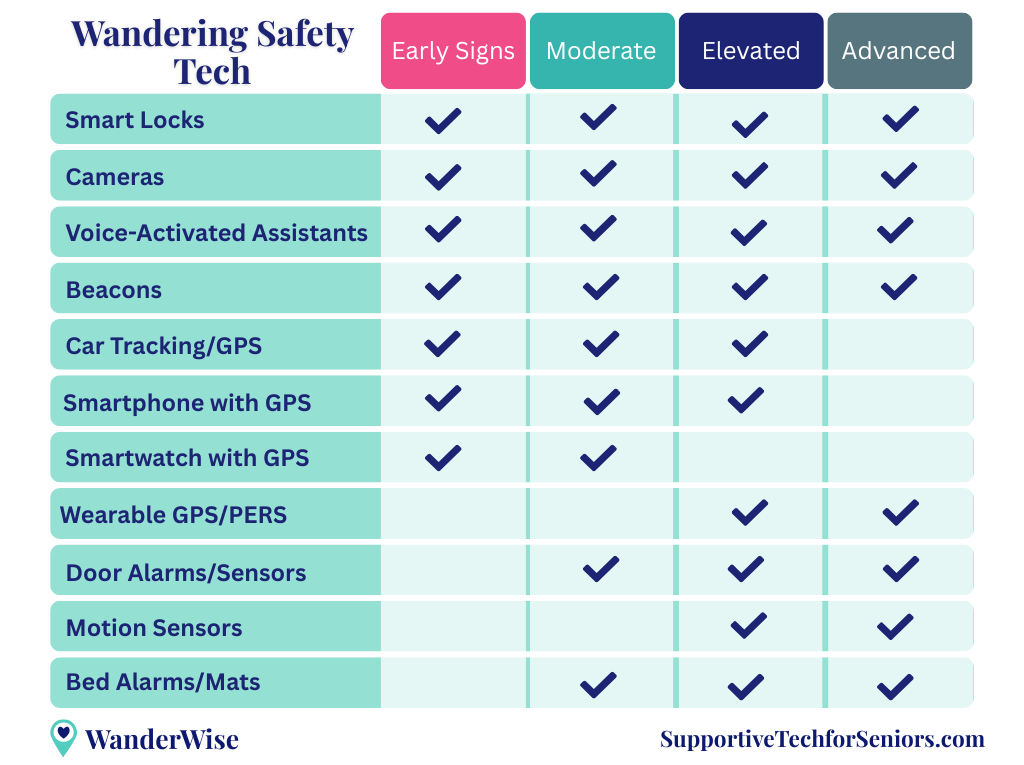
Risk Levels and Technology Focus
These risk levels are based on your Wandering Risk Assessment results and help guide which tools to start with now and what to add as needs change.
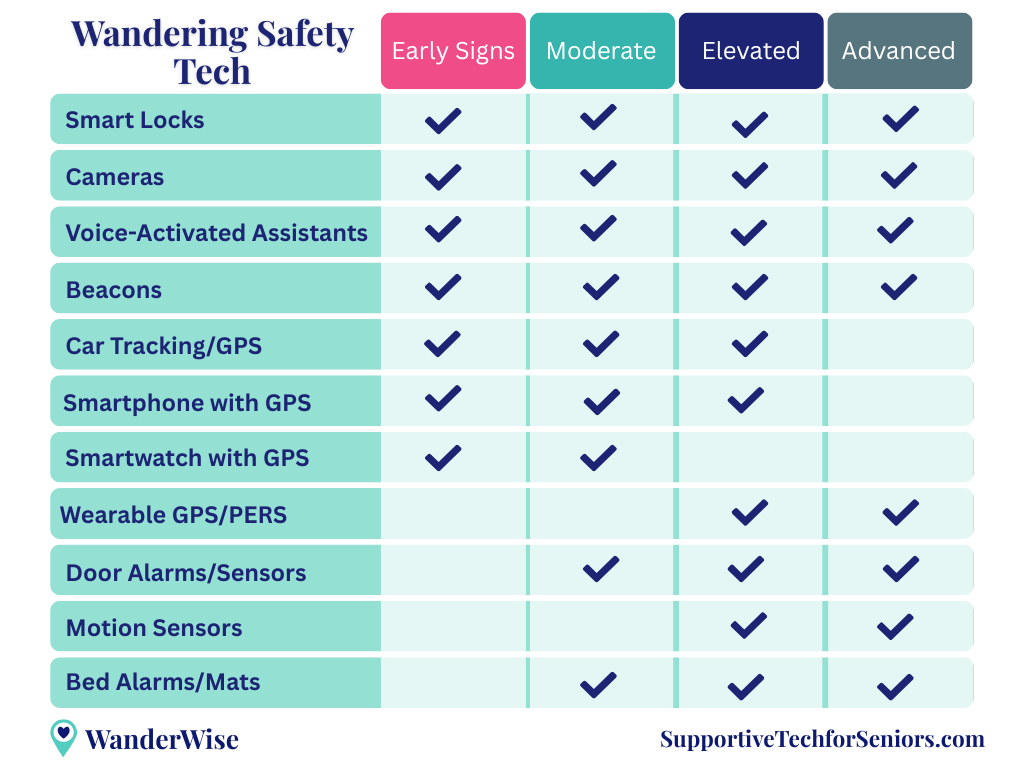
Early Signs (Score: 1–15)
Mild forgetfulness or confusion. There may not be active wandering yet, but now is a great time to introduce simple tools like Smart Locks or Voice Assistants that support safety and build familiarity if needs increase later.
Moderate (Score: 16–29)
You may notice increased disorientation, restlessness, or confusion, especially at night. It’s a good time to introduce monitoring tools and prepare for changing needs.
Elevated (Score: 30–40)
The risk of wandering is high and immediate. Real-time tracking, alarms, and around-the-clock safeguards are essential.
Advanced (Score: 41+)
Wandering risk is high. You’ll need continuous monitoring tools and fast response options to keep your loved one as safe as possible.
As your loved one’s needs change, so should your approach. That’s where layering technology comes in — adding the right tools at the right time, without overcomplicating things.
How Technology Needs Change Over Time
As dementia progresses, your loved one’s needs and risks will change. The tools that work today may not be enough tomorrow. You don’t need to choose everything at once. Instead, we recommend checking in regularly to see what’s working, what’s not, and what might help next.
For example, in the Early Signs stage, a Smart Lock may be all you need to secure exits. But by the Elevated stage, you might add a Wearable GPS or motion sensor to respond more quickly if they begin to leave without notice.
We’re here to help you adjust over time, so you can find the right balance between safety, dignity, and peace of mind. As needs change, some trade-offs may be necessary.
If you haven’t taken the assessment yet, click here to get your personalized score and see where your loved one falls on the risk graph.
Layering Technology for Comprehensive Support
There’s no single device that solves wandering — but there is a strategy that works: layering. This means combining several tools that work together to prevent, monitor, and respond to wandering behaviors, based on your loved one’s risk level.
For example, you might start with:
- A Smart Lock to prevent unnoticed exits, then add
- A Camera to observe patterns or nighttime activity, and finally
- A Wearable GPS to help you find your loved one quickly if they leave.
As their needs shift, you can adjust or expand your layers — always building a system that supports both awareness and peace of mind.
Choosing Tools Based on Behavior
Every caregiving situation is different. While the risk level provides helpful guidance, daily behaviors often offer the clearest cues. Here are some common patterns and which tools may help:
If they dislike wearing devices
Choose tools they don’t have to wear: Smart Locks, Alarms, Motion Sensors, Cameras, and Voice Assistants can all provide awareness without requiring your loved one to interact with them.
If your loved one has wandered before
Prioritize tracking tools. Smart Watches (Early to Moderate stages), Smartphones (Early to Elevated), or Wearable GPS devices (Elevated to Advanced) can help you locate them quickly. Geofencing can add extra peace of mind.
If they wake at night and move around
A Bed Alarm or Pressure Mat can gently alert you when they get up, especially helpful starting in the Moderate stage.
If they try doors or talk about “going home”
Place a Motion Sensor near exits. These are especially helpful if signs of exit-seeking are already happening.
If they still drive or have access to a car
Use a Car GPS Tracker during the Early to Elevated stages. It helps you locate them if they become lost while driving.
If exits are easily accessible
Smart Locks are useful at any stage. If risk increases, layer in Door Alarms or Motion Sensors earlier than originally planned.
If they respond to spoken prompts
Voice Assistants can gently guide with reminders, routines, or reassurance and support awareness across all stages.
🔒 Smart Locks (Recommended for All Stages)
- What It Is
Smart locks are keyless door locks controlled through your phone, a keypad, or fingerprint access. Some models lock automatically or send notifications when the door is opened. - Why It’s Helpful
Smart locks secure doors discreetly without restricting your loved one inside the home. They don’t require your loved one to do anything differently, which helps preserve their routine and dignity. Many also offer remote unlocking or fingerprint access, which can prevent your loved one from getting locked out if they step outside and forget how to get back in. - Why It’s Suggested at All Stages
Even at the Early Signs stage, occasional confusion or forgetfulness can make exits risky. Smart locks offer a simple but powerful foundation, and they scale well as needs increase.
📍 Beth’s Smart Lock Picks
Eufy Video Smart Lock E330 with Camera and Doorbell — remote control, fingerprint entry, door camera, and Alexa integration in one device
Eufy Smart Lock C220, Fingerprint Entry — same fingerprint and remote access without the camera, for homes that already have a doorbell
As an Amazon Associate I earn from qualifying purchases at no extra cost to you.
Find more about Smart Locks here: Best Door Locks for Dementia Wandering: A Caregiver’s Guide to Safer Exits
📹 Camera (Recommended for All Stages)
- What It Is
A camera lets you monitor activity in and around the home. Options range from doorbell cameras (which record and alert you when someone approaches or leaves) to indoor cameras (which help you monitor movement, restlessness, or concerns inside the home). - Why It’s Helpful
Cameras offer awareness without being intrusive. Whether you’re in another room or away from home, they allow you to check in and better understand your loved one’s patterns, like pacing near a door or being awake at unusual hours. Many models include two-way audio, motion alerts, and night vision. - Why It’s Suggested at All Stages
At the Early Signs stage, a doorbell camera is often enough to provide insight and alert you if your loved one leaves unexpectedly. As wandering risk increases, consider adding indoor cameras in high-risk areas like near exits or hallways.
If cameras feel too invasive, start with just one in a common area and build from there. Many caregivers find them helpful not just for awareness but also for spotting changes in routine.
📍 Beth’s Camera Pick
For most caregiving situations I recommend starting with an indoor camera that covers the main living area or the exit most likely to be used. Clear night vision and motion alerts are the two features that matter most.
Beth’s Recommended Indoor Camera — motion alerts, two-way audio, night vision, easy setup
As an Amazon Associate I earn from qualifying purchases at no extra cost to you.
🗣️ Voice-Activated Assistants (Recommended for All Stages)
What It Is
Devices like Amazon Alexa or Google Nest respond to voice commands, give reminders, play music, or enable video calls. Some models include screens and cameras such as the Echo Show.
Why It’s Helpful
These devices can offer gentle reminders like “It’s time to stay inside,” help your loved one feel connected by playing favorite music or allowing them to call you, and connect with smart locks or lights as part of a broader support setup.
Why It’s Suggested at All Stages
In the early stages, voice assistants support routine and connection. Later, they become helpful for redirection and caregiver alerts, especially if linked to motion or door sensors.
📍 Beth’s Voice Assistant Picks
For the best caregiving experience I recommend an Echo Show with a screen. The visual display makes video calls, reminders, and Drop-In check-ins much easier for seniors to use.
To connect Alexa to smart locks and routines, a smart plug makes it easy to control lamps and appliances by voice:
Kasa Smart Plug by TP-Link — reliable, Alexa and Google compatible, no hub required
As an Amazon Associate I earn from qualifying purchases at no extra cost to you.
🧭 Beacons and Trackers (Recommended for All Stages)
- What It Is
Beacons are small Bluetooth trackers that attach to keys, bags, or clothing. They help you find misplaced items nearby and may give you a last known location if your loved one moves out of range. Examples include Apple AirTags, Tile, and Samsung SmartTags. - Why It’s Helpful
Beacons are affordable, discreet, and easy to use, especially for caregivers just beginning to add supportive tech. Most don’t require charging or any setup from your loved one. - Why It’s Suggested at All Stages (With Limitations)
Beacons are a helpful foundational tool, particularly during early-stage dementia or when leaving the house together. However, Bluetooth range is limited (often under 100 feet) and effectiveness depends on nearby phones. They work best in populated areas and should be layered with other tools as risk increases.
📍 Beth’s Tracker Picks
Apple AirTag 4-Pack — best for iPhone users. Tag shoes, a jacket, a bag, and keep one spare. About $25 for four.
Tile Pro by Life360 — best for Android users or mixed iPhone and Android households.
As an Amazon Associate I earn from qualifying purchases at no extra cost to you.
Important Note on Privacy and Tracking
Because beacons may be used to monitor someone’s movement, it’s essential to understand the laws in your state. Tracking a person, especially without their knowledge or consent, can raise legal and privacy concerns. In some cases, formal authority such as guardianship or Power of Attorney may be required. Always check your state’s consent rules before using a tracking device with a loved one.
For more information on beacons, check out:
Bluetooth Trackers and Dementia Wandering: What Caregivers Should Know
5 Things Caregivers Should Know About Using AirTags for Dementia Wandering
🚗 Car Tracking / GPS (Recommended for Early Signs to Elevated)
Why It’s Suggested at Early Signs to Elevated Stages
If someone is still driving but shows signs of confusion or poor judgment, this tool provides a critical early layer of awareness while allowing independence as long as it’s safe.
What It Is
A small device that plugs into your car’s OBD2 port and tracks its location in real time. It can alert you if the car is driven outside a designated area, at unusual hours, or if an accident occurs.
Why It’s Helpful
If your loved one still drives, a car tracker gives you real-time awareness of where they are without requiring them to do anything differently. You’ll know if they’ve left the house, whether they’ve arrived somewhere safely, and if they’ve wandered outside a familiar area.
📍 Beth’s Car Tracker Pick
Bouncie is the car tracker I recommend most often for families in this situation. It plugs directly into the car’s diagnostic port in seconds, no tools or installation needed. The app shows real-time location, geofencing alerts, and driving behavior. At around $8 to $10 per month with no contract, it’s one of the most affordable real-time tracking options available.
Bouncie GPS Tracker for Vehicles — real-time location, geofencing alerts, accident detection, no contract required
Note: Bouncie requires a monthly subscription of approximately $8 to $10/month for cellular data. As an Amazon Associate I earn from qualifying purchases at no extra cost to you.
📱 Smartphone with GPS (Recommended for Early Signs to Elevated)
Why It’s Suggested at Early Signs to Elevated Stages
For individuals who are still confidently using a phone, GPS tracking can be added with little change to their routine. As memory issues increase, it may need to be replaced with a simpler device or wearable GPS.
What It Is
Any smartphone with built-in GPS and location-sharing apps like Find My iPhone or Life360.
Why It’s Helpful
Smartphones offer discreet tracking and geofencing alerts while also letting your loved one stay connected. Many already use their phone regularly, which makes this option feel natural.
Note: Smartphones work well for location sharing in early and moderate stages when your loved one still carries their phone consistently. By the elevated stage, a purpose-built wearable is usually more reliable. See the Wearable GPS section below for elevated and advanced stage options.
⌚ Smartwatch with GPS (Recommended for Early Signs and Moderate)
Why It’s Suggested at Early Signs and Moderate Stages
At these stages, a smartwatch blends in easily and provides helpful location information without labeling someone as “at risk.” It’s best used before wearable GPS becomes necessary.
What It Is
A watch with built-in GPS tracking and health monitoring features like fall detection, heart rate alerts, and emergency calling. The best models for seniors combine location awareness with health monitoring in a device that looks like an everyday watch.
Why It’s Helpful
Smartwatches are ideal for individuals who are still mobile and already used to wearing a watch. They offer discreet tracking, health monitoring, and fit naturally into daily routines without signaling that the wearer needs extra help.
📍 Beth’s Smartwatch Picks
I recommend two watches depending on which phone ecosystem your loved one uses:
Apple Watch Series 11 — my top pick for iPhone users. Fall detection, heart rate monitoring, emergency SOS, GPS, and Drop-In calling all in one device. Works independently from the iPhone with the cellular model.
Google Pixel Watch 4 — my recommendation for Android users. I’ve been testing this one personally for several months. The screen is large and bright, which makes it much easier for seniors to read. It also includes heart rate monitoring and emergency alerts. A full review is coming soon.
Both watches require daily charging and work best when the wearer is in the early to moderate stages and can manage a consistent routine.
As an Amazon Associate I earn from qualifying purchases at no extra cost to you.
📍 Wearable GPS / PERS (Recommended for Elevated and Advanced)
Why It’s Suggested at Elevated and Advanced Stages
As wandering becomes more likely or dangerous, wearable GPS tools are essential for real-time location tracking and response, especially when your loved one is no longer reliably using a phone.
What It Is
A discreet device such as a bracelet, watch, or wearable sleeve with real-time GPS tracking. Most include a help button, geofencing alerts, and two-way communication so you can speak directly with your loved one if they become disoriented.
Why It’s Helpful
Wearables give you real-time location as soon as your loved one leaves a safe zone, not just a last known location. Most are designed so the senior doesn’t need to do anything to activate tracking. Some designs look like everyday accessories, which makes acceptance much easier.
Note: Smartphones work well for location sharing in early and moderate stages, but by the elevated stage a purpose-built wearable is usually more reliable. If your loved one is still using a phone consistently, see the Smartphone section above.
📍 Beth’s Wearable GPS Note
This is the category I’m most careful about recommending because the right device depends heavily on your loved one’s stage, their willingness to wear something, and your budget. I cover this in much more detail in my full GPS tracker guide linked below.
For elevated and advanced stages, AngelSense is the device I most often point families toward. It was specifically designed for individuals with dementia and cognitive differences. It includes continuous real-time tracking, a non-removable sleeve option for loved ones who tend to take devices off, two-way audio so you can speak with them directly, and caregiver alerts the moment they leave a safe zone.
Learn more about AngelSense — purpose-built for dementia, continuous GPS, non-removable wear option, two-way communication
Note: AngelSense is not an Amazon product. We are not compensated for this recommendation — we include it because it is genuinely the best fit for this stage of care.
For a full comparison of wearable GPS options at every price point, including subscription costs and which devices work best for different stages of dementia: Best GPS Trackers for Dementia Wandering
🚪 Door Alarms and Sensors (Recommended for Moderate, Elevated, and Advanced)
Why It’s Suggested at Moderate and Higher Stages
Once you start noticing attempts to leave, especially at night or when your loved one is alone, alarms offer a nonintrusive way to increase awareness. As wandering risk grows, these become an essential layer.
What It Is
Small devices placed on doors or windows that make a sound or send a phone alert when opened. Some are silent but notify you directly, while others have adjustable volume options.
Why It’s Helpful
Alarms can give you early notice of exit attempts, especially helpful at night or when you’re in another room. Many are easy to install with adhesive and require no wiring.
📍 Beth’s Door Alarm Pick
For most homes I recommend starting with a simple door alarm on the main exit. Easy to install, no wiring, and alerts you immediately when the door is opened.
Beth’s Recommended Door Alarm — easy adhesive install, adjustable alert volume, no wiring required
As an Amazon Associate I earn from qualifying purchases at no extra cost to you.
🎯 Motion Sensors (Recommended for Elevated and Advanced)
- What It Is
Discreet sensors that detect movement near specific areas like doors, hallways, or beds and send alerts via sound or smartphone notifications. - Why It’s Helpful
Motion sensors provide quiet awareness, notifying you when your loved one moves near an exit or starts pacing. They don’t require your loved one to wear anything or interact with the device. - Why It’s Suggested at Elevated and Advanced Stages
As wandering risk increases, motion sensors can offer early warning of exit attempts or restlessness. They work especially well at night or in homes with multiple exits.
📍 Beth’s Motion Sensor Pick
For most homes I recommend starting with a simple motion sensor near the main exit. The Ring Alarm Motion Detector is reliable, integrates with Ring cameras many families already have, and sends phone alerts instantly.
Ring Alarm Motion Detector 2-Pack
As an Amazon Associate I earn from qualifying purchases at no extra cost to you.
🛏️ Bed Alarms and Pressure Mats (Recommended for Moderate, Elevated, and Advanced)
- What It Is
A sensor placed under a mattress or next to the bed that alerts you when your loved one gets up. - Why It’s Helpful
Nighttime wandering can be especially dangerous. Bed alarms alert you when your loved one leaves the bed so you can respond before they reach a door or become disoriented. - Why It’s Suggested at Moderate and Higher Stages
If your loved one starts waking frequently or shows signs of nighttime restlessness, this is an ideal early intervention. As risk increases, bed alarms become part of a larger nighttime plan.
📍 Beth’s Bed Alarm Pick
The Smart Caregiver bed alarm is one I recommend regularly. The pressure mat goes on the floor beside the bed and sounds a chime the moment weight is detected, giving you time to respond before your loved one reaches a door.
Smart Caregiver Bed Alarm with Floor Mat
As an Amazon Associate I earn from qualifying purchases at no extra cost to you.
Introducing Technology with Care and Respect
How you introduce technology can make a significant difference in maintaining your loved one’s dignity and comfort, especially as their abilities change. Even the most helpful tool can be met with resistance if it feels confusing or controlling. A respectful, gradual approach works best.
Ways to introduce new tools with care:
- Communicate the purpose positively. Explain why you’re using a tool in a way that reassures them. For example: “This lock helps us stay safe so we can keep enjoying time together.”
- Avoid sudden changes. Introduce one new tool at a time, when things feel calm. Sudden shifts in routine can lead to confusion or distress.
- Offer a sense of control. If appropriate, involve your loved one. Let them choose the color of a smartwatch or decide where a camera should go.
- Normalize it as everyday tech. Frame technology as something many people use. For instance: “I use a beacon to keep track of my keys — this one is just for your bag.”
With this kind of approach, technology can become a partner in care rather than a source of tension.
A Note for You, the Caregiver
We see how much you’re doing and how much you’re carrying. Supporting someone at risk of wandering can feel exhausting, uncertain, and sometimes isolating. But please know this: you’re not alone, and you’re already doing something extraordinary by seeking tools to help.
There is no perfect solution. Every tool you try is a step forward. Some will work well, and others might not. But each decision is made from a place of love and protection, and that’s what matters most.
It’s okay to start small. It’s okay to need support. And it’s okay to change course as things evolve.
You’re doing great, and we’re here to walk with you as your partner in this journey.
✅ How to Build a Personalized Tech Plan for Wandering Prevention
Step 1: Know the Risk
Take the Wandering Risk Assessment to learn your loved one’s current risk level.
Step 2: Start Simple
Begin with tools like Smart Locks, a Camera, and Beacons for early awareness and prevention.
Step 3: Layer Tools Over Time
As their needs change, add tools like a Wearable GPS, Alarms and Sensors, or a Voice Assistant.
Step 4: Customize and Commit
Use what you’ve learned to build a plan that fits your loved one’s needs. Start small, stay flexible, and revisit the plan as things change.
Be prepared if Wandering Occurs: Download our Wandering Prep Kit to make planning easier.
The information provided is intended for general guidance only and does not replace personalized medical assessment. Always consult with your loved one’s healthcare team for individualized recommendations and comprehensive wandering prevention strategies tailored specifically to their needs.